Faceless YouTube channels are booming, thanks to AI voiceover tools that make content creation faster, cheaper, and scalable. Whether you’re creating true crime videos, tutorials, or finance content, AI voices can help you produce professional-quality narration without recording yourself. Here’s what you need to know:
- ElevenLabs: Offers the most realistic voices with emotional tagging and voice cloning starting at $5/month.
- PlayHT: Best for expressive narration with 800+ voices in 100+ languages, starting at $14.25/month.
- Murf AI: User-friendly with built-in video syncing and precise editing tools, starting at $13/month.
- Resemble AI: Focused on custom voice cloning and emotional control, with usage-based pricing starting at $19/month.
- WellSaid Labs: Delivers studio-grade quality for professional projects, with plans starting at $55/month.
- Budget Options: Tools like Speechelo ($47 one-time) and Clipchamp (free) are beginner-friendly but less polished.
Quick Tip: Start with budget tools to test your niche, then upgrade as your channel grows. Look for commercial licenses to monetize your content legally. Below is a quick comparison of the tools mentioned.
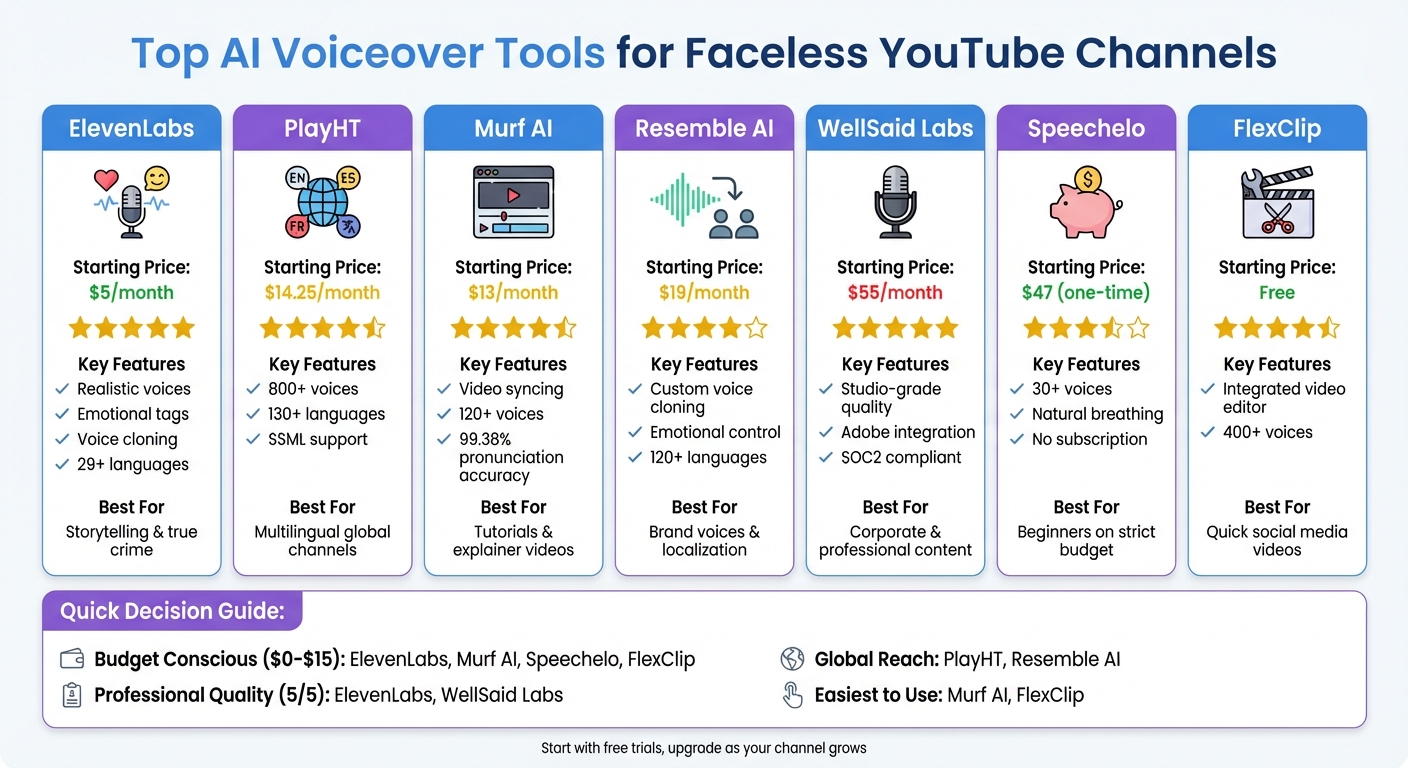
AI Voiceover Tools Comparison: Features, Pricing & Best Use Cases
How to Make FACELESS Youtube Videos with AI Voices with ChatGPT + Murf | Text to Speech Tutorial
Quick Comparison
| Tool Name | Starting Price (USD) | Key Features | Best For |
|---|---|---|---|
| ElevenLabs | $5/month | Realistic voices, emotional tags, cloning | Storytelling, true crime |
| PlayHT | $14.25/month | Expressive tones, 800+ voices, SSML tags | Multilingual global channels |
| Murf AI | $13/month | Video syncing, 120+ voices, easy to use | Tutorials, explainer videos |
| Resemble AI | $19/month | Custom voice cloning, emotional control | Brand voices, localization |
| WellSaid Labs | $55/month | Studio-grade quality, Adobe integration | Corporate, professional content |
| Speechelo | $47 (one-time) | Affordable, beginner-friendly | Simple projects, testing niches |
Choosing the right tool depends on your budget, content style, and target audience. Start small, explore free trials, and scale up as your channel gains traction.
ElevenLabs: Most Realistic Voices
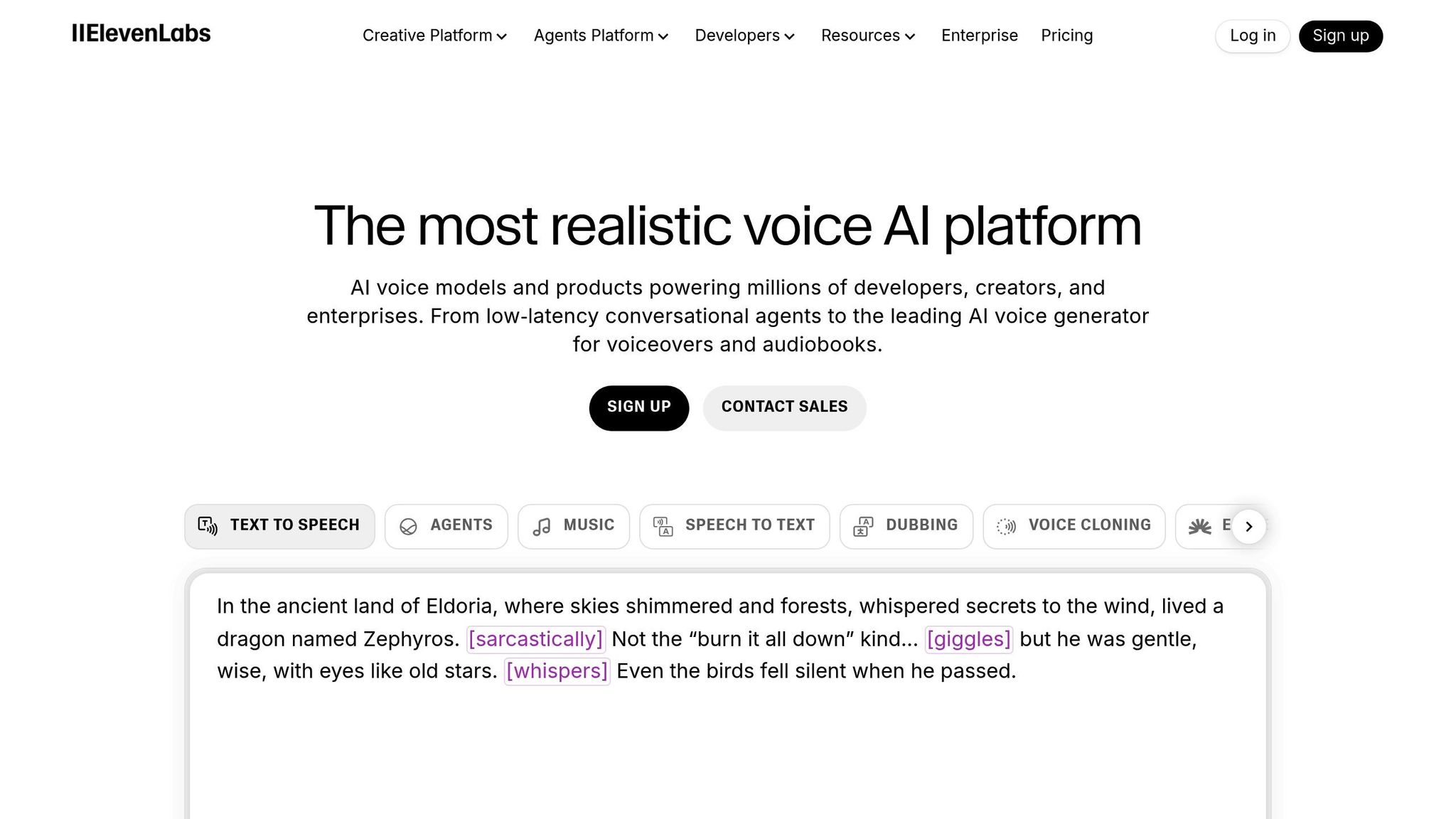
For YouTube creators who prefer staying behind the scenes, ElevenLabs offers more than just lifelike narration – it delivers efficiency at scale. Known for its highly realistic AI voices, the platform boasts over 47 million monthly active users as of September 2025 and is trusted by 41% of Fortune 500 companies, including heavyweights like TIME and HarperCollins. It’s widely regarded as the go-to solution for studio-quality narration.
The standout feature is the Eleven v3 model, which uses inline emotional tags like [whispers], [laughs], [angry], and [excited] to seamlessly handle pauses, breathing, and tone changes. The result? Narration that feels dramatic and natural – perfect for long-form content such as video essays or true crime documentaries. Traditional text-to-speech simply can’t compete with this level of nuance.
Another game-changing feature is voice cloning, which allows you to replicate your voice digitally. With Instant Cloning, you need just 30 seconds of audio, while the Professional Voice Cloning option requires 30+ minutes for even greater accuracy. This ensures a consistent voice for your channel without the hassle of recording every script. Additionally, ElevenLabs supports more than 29 languages (with updates in 2025 suggesting over 70) and retains accents during localization, making it an excellent tool for reaching global audiences.
Real-World Impact
The platform’s capabilities aren’t just theoretical – they deliver measurable results. For example, in 2025:
- Gaia, a media company, cut dubbing time by 25% after adopting ElevenLabs’ multilingual tools.
- Convin saw a 27% boost in customer satisfaction scores thanks to the platform’s realistic AI voices.
- Praktika reported a 15% increase in user engagement after integrating emotionally expressive voice models.
ElevenLabs also offers professional 48kHz audio quality across all plans and impresses with an ultra-fast 75ms latency, making it a top choice for real-time applications.
Pricing and Additional Features
Plans start at $5/month for 30,000 characters, which includes a commercial license and instant cloning. However, actual usage often costs between $12 and $15 per month due to regeneration rates that are 2.2x–2.8x higher than the base allocation. A free tier is available, offering 10,000 characters and three Studio projects for testing.
In 2025, ElevenLabs introduced AI music generation with commercial licensing through Merlin Network and Kobalt. Notably, it’s the only platform currently offering this feature.
Pros and Cons of ElevenLabs
| Pros | Cons |
|---|---|
| Exceptional emotional realism with v3 model tags | Costs about 6x more than OpenAI TTS |
| Professional voice cloning from as little as 30 seconds of audio | Music generation credits don’t roll over monthly |
| Supports 29+ languages with accent preservation | Limited free tier for extensive testing |
| Includes commercial music licensing (unique feature) | Regeneration costs require careful budgeting (2.2x–2.8x higher) |
| Studio-grade 48kHz audio quality on all plans | Advanced features may take time to master |
| Ultra-low 75ms latency for real-time use | Free tier capped at 10,000 characters |
Next, we’ll explore tools that compete with ElevenLabs in delivering expressive narration.
PlayHT: Best for Expressive Narration
If you’re creating faceless content that relies on emotional storytelling, PlayHT offers a solution with its dynamic and expressive narration capabilities. It boasts a library of over 800 natural-sounding voices in more than 100 languages and accents. With a 92/100 expressiveness rating based on 2025 reviews, it’s widely recognized for delivering emotionally rich voiceovers.
PlayHT allows you to customize tones – whether conversational, narrative, or emotion-driven – by adjusting rate, pitch, and emphasis using SSML tags. This level of control ensures your AI narrator can effortlessly transition between emotions, such as shifting from excitement to seriousness. It’s a perfect fit for short-form content like YouTube Shorts or TikTok videos.
The platform also supports multi-voice dialogues and includes a custom pronunciation library to handle technical terms accurately. Its robust multilingual features ensure native accents are preserved during translations, making it a versatile tool for creators working across different languages.
Pricing starts at $14.25 per month (billed annually), with a free plan that includes 5,000 words per month, albeit with a watermark. For more extensive needs, higher-tier plans are available, such as $39 per month for approximately 600,000 words annually, or $99 per month for unlimited usage.
Pros and Cons of PlayHT
| Pros | Cons |
|---|---|
| Wide emotional range with dynamic speaking styles | Interface may be challenging for beginners |
| Extensive library of 800+ voices in 100+ languages | Free plan exports include a watermark |
| Multi-voice dialogue support in a single file | Some voices may need manual adjustments for realism |
| Detailed control over pitch, rate, and emphasis | Unlimited plans are relatively pricey at $99/month |
| Custom pronunciation editor for technical terms | Advanced SSML features may require practice to master |
| Affordable starting price of $14.25/month |
Murf AI: Easy to Use with Good Features
Murf AI combines quality and efficiency with an interface that’s simple to navigate. It offers a selection of 120-200 lifelike voices in over 20 languages, including accents like US, UK, and Australian English. One standout feature is its timeline editor, which syncs voiceovers with video, images, and music, making production smoother and cutting down on post-production time.
The platform gives creators precise control over their projects with tools like pitch adjustments (ranging from –50% to +50%), speed controls (0.5x to 2x), and word emphasis. Murf AI’s Speech Gen 2 technology, trained on more than 70,000 hours of speech data, delivers an impressive 99.38% pronunciation accuracy. For creators targeting global audiences, the MultiNative feature stands out – it allows a single voice to transition between up to 10 languages mid-sentence without skipping a beat.
"Murf’s timeline studio is approachable for non-technical users via templates, drag-and-drop media, and a pronunciation editor." – GetListen2It
Another handy tool is the "Say It My Way" feature, which lets you record your own pronunciation for specific terms, such as brand names or technical jargon. The AI then replicates your intonation, ensuring consistency across your content. With over 6 million active users and a client base that includes 300+ Fortune 2000 companies, Murf AI has become a trusted platform for professional content creators.
Murf AI also offers flexible pricing to accommodate a range of needs. The Creator plan starts at $13 per month, providing 2-4 hours of voice generation and full commercial rights. For those who want to test the waters, a free trial includes 10 minutes of voice generation (though it doesn’t allow file downloads). For more advanced users, the Business plan ranges from $79 to $99 per month, offering 8 to 20 hours of generation and voice cloning capabilities. Enterprise plans, with unlimited generation, are available through custom pricing.
Pros and Cons of Murf AI
| Pros | Cons |
|---|---|
| Intuitive timeline editor simplifies syncing audio with visuals | Monthly generation limits (2–20 hours) may be restrictive for high-volume creators |
| 99.38% pronunciation accuracy with natural breathing | Voice cloning supports English only |
| MultiNative feature allows seamless mid-sentence language switching | Requires a constant internet connection; no offline mode available |
| 8,000+ licensed soundtracks and sound effects included | Advanced features like "Say It My Way" can take time to master |
| All paid plans include commercial rights for YouTube monetization | Struggles with high-drama or character-specific voice acting |
| Clean, beginner-friendly interface | Free version doesn’t allow file downloads |
Resemble AI: Custom Voice Cloning
Resemble AI takes voice personalization to the next level with its custom voice cloning capabilities. This platform allows you to replicate your voice or create a distinctive brand voice using either quick or professional cloning methods. Quick cloning generates instant results from short audio samples, while professional cloning uses 5–10 minutes of clean audio to produce high-quality voice models. These tailored voice solutions pair seamlessly with other tools to boost success in faceless video projects.
One standout feature is its emotion control, which lets you tweak pitch, pacing, pauses, and emotional tones – like calm, friendly, or energetic – to perfectly align with your video’s mood. Using Speech-to-Speech (S2S) technology, you can record your desired performance, and the AI will transform it into your target voice while retaining all the subtle nuances and intent.
Resemble AI also supports over 120 languages and accents, ensuring global reach while maintaining consistent voice quality. Its timeline editor simplifies syncing audio with visuals, making it easier to create polished content. A noteworthy example: in May 2025, Zomato and TrueFan used Resemble AI to generate more than 354,000 personalized video messages featuring AI-generated voices of Bollywood celebrities for a Mother’s Day campaign. This highlights the platform’s ability to handle large-scale, high-impact projects.
Pricing
Resemble AI uses a usage-based pricing model, starting at $0.006 per second (approximately $0.36 per minute) after the first 150 free seconds. The Creator plan costs $19 per month and includes 15,000 seconds of voice generation, along with 3 quick clones and 1 professional clone. For those with higher demands, the Business plan is priced at $699 per month, offering 360,000 seconds, 500 quick clones, and full API access for automation. Custom Enterprise plans are also available, featuring real-time S2S and tailored voice training.
While some features, like emotion modulation and API integration, come with a learning curve, they deliver an unmatched level of customization and authenticity. Additionally, Resemble AI incorporates enterprise-grade safety measures, such as AI watermarking and deepfake detection, to prevent unauthorized use of cloned voices.
Pros and Cons of Resemble AI
| Pros | Cons |
|---|---|
| Highly realistic and emotive voice output | Advanced features can take time to master |
| Fine-tuned control over pitch, speed, and tone | Commercial cloning may require extended training |
| Speech-to-Speech retains human-like nuance | Usage-based pricing can add up |
| Supports over 120 languages and accents | Internet connection required for voice generation |
| Robust API for scaling and automation | Deep customization may need technical expertise |
sbb-itb-4bfa3ba
WellSaid Labs: Professional-Grade Quality
WellSaid Labs stands out by offering voiceovers that meet enterprise-level, studio-quality standards. It’s no surprise that over half of the Fortune 500 companies rely on this platform. With a library of more than 120 voices, all crafted from high-quality studio recordings, the platform ensures its output sounds like genuine voice actors – not like the typical robotic text-to-speech alternatives. This level of quality makes editing smoother and ensures ethical usage.
For creators, especially those running faceless YouTube channels, the platform’s workflow integrations are a game changer. WellSaid Labs provides exclusive plugins for tools like Adobe Premiere Pro, Adobe Express, and Canva, allowing you to tweak scripts directly within your editing software. And thanks to its Oxford Dictionary–powered pronunciation technology, the platform delivers accurate pronunciations for complex terms and brand names, making it particularly useful for educational or finance-related content.
Security and ethics are at the core of WellSaid Labs. The platform is SOC2 Type 2 and GDPR compliant, ensuring your data stays private and isn’t used to train AI models. Additionally, all voiceovers are created with the written consent of compensated actors, preventing unauthorized cloning and ensuring ethical sourcing. As WellSaid Labs emphasizes:
Ethics is the backbone of WellSaid. Every voice you find on our platform is built with the explicit written consent of the voice talent.
That said, the platform does have its limitations. While its voices excel in delivering clear and professional narration – perfect for explainer videos, corporate presentations, and educational content – they may not offer the emotional depth or nuanced pitch control found in tools like ElevenLabs.
When it comes to pricing, WellSaid Labs offers two main plans. The Creative Plan costs about $55 per month (billed annually) and includes 60 downloads. The Business Plan, aimed at teams, is priced at $179 per user per month and offers 9,000 downloads along with collaboration tools. To put this into perspective, professional voice actors can charge up to $200 per minute, whereas WellSaid Labs provides roughly 6,000 minutes of voiceover for around $200 per month. This makes it a strong option for creators looking to maintain a polished and reliable brand voice. With a 4.7/5 rating on G2, users frequently praise its high-quality voiceovers and streamlined workflows, though some mention the premium pricing and limited emotional variety.
Pros and Cons of WellSaid Labs
| Pros | Cons |
|---|---|
| High-quality, ultra-realistic voiceovers | Higher price point compared to creator-level tools |
| SOC2 Type 2 and GDPR compliance ensures data security | Limited emotional expressiveness in voices |
| Seamless integration with Adobe Premiere Pro and Canva | Fewer options for pitch and speed adjustments |
| Ethical voice sourcing with compensated actors | No unlimited usage in standard plans |
| Accurate pronunciation of technical terms and brand names | Advanced features may require some learning curve |
Budget-Friendly Alternatives
If you’re just starting out, budget-friendly tools can help you experiment and refine your content without breaking the bank. Spending $50+ per month on voiceovers might not make sense initially, especially when there are affordable options that deliver decent quality. For instance, Clipchamp offers a free tier, making it an excellent choice for beginners – especially if you’re already using Microsoft products. Another solid option is LOVO (also called Genny), which starts at about $24 to $25 per month when billed annually. It provides professional-grade voices with emotional settings and even includes a built-in video editor with AI subtitles. For creators on tighter budgets, iMyFone VoxBox offers over 3,200 AI voices starting at just $9.95 per month. Alternatively, Speechelo provides a one-time payment option of $47 for access to 30+ voices, while Talking.Network delivers 100,000 characters for a one-time fee of $10.
Of course, there’s a trade-off. Budget tools often lack the emotional nuance and natural flow you’d find in premium options. As Aivoicepedia puts it:
Budget tools are fine for early testing; once a channel has momentum, upgrade narration before viewers start complaining.
You may notice that some voices from these platforms sound slightly robotic. While this might work for YouTube Shorts or quick tests, it may fall short for longer videos where a polished sound is crucial. For just $5 per month, Voicemaker offers access to 750+ voices, while FlexClip provides a free tier for those just getting started.
The key is to use these budget tools to validate your content niche and gain traction. Many successful faceless channels began with tools like Clipchamp or Speechelo before transitioning to advanced options like ElevenLabs or PlayHT as their audience grew.
If you’re looking for one of the most affordable annual options, RecCloud charges just $3 per month (billed annually at $36), making it a smart choice for creators producing high volumes of content on a limited budget. However, keep in mind that most budget tools require a commercial license for YouTube monetization, so always double-check the terms before uploading your videos.
Pros and Cons of Budget Options
| Tool | Starting Price | Pros | Cons |
|---|---|---|---|
| Clipchamp | Free | Free tier available; integrates well with Microsoft tools | Limited emotional control; basic editing features |
| LOVO (Genny) | $24–$25/mo | Includes video editing and AI subtitles; 400+ voices | Voice cloning often locked behind higher tiers; occasional UI glitches |
| iMyFone VoxBox | $9.95/mo | Huge library of 3,200+ voices; beginner-friendly | Lacks the emotional depth of premium tools |
| Speechelo | $47 (one-time) | No ongoing subscription; quick and easy setup | Limited voice variety; less natural-sounding voices |
| Talking.Network | $10 (one-time) | Realistic voice at a very low cost | Basic interface; lacks advanced editing features |
| Voicemaker | $5/mo | Very affordable; access to 750+ voices | Minimal customization options; simple interface |
This comparison table highlights the features and costs, helping you pick the tool that best fits your needs and budget.
Comparison Table: Features and Pricing
Here’s a side-by-side look at popular AI voiceover tools to help you match their features and pricing with your channel’s needs.
| Tool Name | Primary Strength | Voice Quality Rating | Starting Price (USD) | Key Features | Best Use Case |
|---|---|---|---|---|---|
| ElevenLabs | Realism & Expression | 5/5 | $0 (Free Plan) | Voice cloning, 29+ languages, adjustable pacing | Storytelling & high-end narration |
| PlayHT | Language Variety | 4.5/5 | $0 (Free Plan) | 800+ voices, 130+ languages, SSML support | Multilingual global channels |
| Murf AI | Ease of Use | 4.5/5 | $19/month | Built-in video sync studio, 120+ voices | Tutorials & explainer videos |
| Resemble AI | Custom Cloning | 4/5 | $0.006/sec | Speech-to-Speech, real-time editing, API | Unique brand voices & localization |
| WellSaid Labs | Professional Quality | 5/5 | ~$55/month | Studio-grade avatars, commercial rights | Corporate & commercial ads |
| Speechelo | Budget-Friendly | 3.5/5 | $47 (One-time) | 30+ voices, natural breathing tones | Beginners on a strict budget |
| FlexClip | All-in-One Suite | 4.5/5 | $0 (Free) | Integrated video editor, 400+ voices | Quick social media video creation |
Note: Some tools, like ElevenLabs and PlayHT, offer free plans, while Speechelo provides a one-time payment option. On the other hand, WellSaid Labs delivers studio-grade quality but comes with a higher monthly cost.
Voice quality ratings reflect how natural and expressive the output sounds. Tools like ElevenLabs and WellSaid Labs lead the pack with perfect scores of 5/5, making them ideal for projects that demand hyper-realistic and emotionally engaging narration, such as storytelling or true crime content. In contrast, Speechelo, rated at 3.5/5, is a more affordable option but delivers less polished results – still effective for simpler projects.
If you’re working on tutorials or explainer videos, tools rated 4/5 or 4.5/5 are often sufficient. However, for monetized channels, ensure you check each tool’s licensing terms, as commercial usage rights typically require a paid plan.
Use the table above to narrow down the best voiceover tool for your content strategy before diving into the next steps.
How to Choose the Right Tool for Your Channel
Picking the right AI voiceover tool can make or break your faceless content strategy. The key is to align the tool with your content’s style and emotional tone. For example, if you’re focusing on storytelling, you’ll want a tool that delivers highly realistic voices. On the other hand, instructional content might benefit from a more neutral, professional tone.
Cost and workflow integration are also important factors. Different tools use different pricing models: some, like ElevenLabs, charge per character, while others, such as Resemble AI, charge per second or offer unlimited plans. To make the best choice, estimate your monthly usage and compare these models to find what fits your budget.
Licensing terms are another critical consideration, especially if you plan to monetize your content on YouTube. Make sure your subscription includes the necessary commercial usage rights to avoid any legal headaches down the line.
Instead of relying on just one tool, consider building a "tool stack" to broaden your capabilities. For example, you might use ElevenLabs as your primary voice for storytelling, pair it with a localization tool like Play.ht to translate content into other languages (such as Spanish, Hindi, or Arabic), and add a productivity booster like Speechify for tasks like script proofreading. This approach not only helps maintain a consistent channel identity but also expands your potential audience.
Before committing to a premium tool, take advantage of free or budget-friendly options to test the waters in your niche. Once your channel starts gaining traction, you can invest in more advanced tools. A consistent AI voice can become a recognizable part of your channel’s identity, helping to build viewer loyalty. With the right tools and a steady workflow, faceless YouTube can grow into a profitable venture, even offering a source of passive income.
Conclusion
Picking the right AI voiceover tool is all about aligning your content’s needs with the tool’s specific features. For narrative-heavy channels, ElevenLabs stands out with its ability to convey emotional depth. On the other hand, Murf AI and WellSaid Labs excel in delivering polished, professional tones, making them perfect for educational or corporate content. If your goal is to connect with audiences worldwide, PlayHT offers a massive library of over 800 voices in 130+ languages, making it a go-to for localization. And for maintaining brand consistency without the hassle of repeated recordings, Resemble AI provides impressive voice cloning capabilities.
While budget is a factor, consistency is the real key to growth. Affordable tools like Speechelo, with its one-time payment model, are great for testing your niche without a big upfront commitment. As your channel gains momentum, upgrading to subscription-based tools like ElevenLabs (starting at $5/month) or WellSaid Labs (around $55/month) can elevate your content’s quality, especially for faceless channels looking to boost viewer engagement and brand credibility.
Success in faceless channels often comes from combining the right tools in a strategic stack. Use one core voice for brand identity, add a localization tool to expand your reach, and consider productivity aids like Speechify to streamline script editing. This balanced approach not only scales your content production but also ensures the authenticity that keeps viewers loyal. It’s a proven formula for building a sustainable and impactful faceless YouTube brand.
FAQs
What should I look for in an AI voiceover tool for my faceless YouTube channel?
When selecting an AI voiceover tool for your faceless YouTube channel, focus on audio quality and how natural it sounds. A realistic and consistent voice across your videos helps create a seamless experience for your viewers. Opt for tools that provide expressive, lifelike voices to avoid the monotony of robotic tones, which can drive audiences away.
Look into customization features such as tone adjustments, emotional expressions, and even voice cloning. These options allow you to tailor the voice to fit your content style – whether you’re creating tutorials, narrating stories, or producing documentaries. If your channel aims to reach a global audience, multilingual support and regional accents are essential for connecting with a broader viewer base.
Finally, don’t overlook pricing and workflow tools. Compare free and paid plans (priced in USD) to find one that meets your budget. Check for features like bulk exporting, integrations with video editing software, and commercial-use rights. A tool that streamlines editing and automates processes can save time, letting you concentrate on crafting compelling videos.
How can I make sure my AI voiceovers meet YouTube’s monetization rules?
To make sure your AI-generated voiceovers align with YouTube’s monetization policies, here’s what you need to do:
- Use original or properly licensed scripts: Don’t copy content from blogs, books, or other creators without permission. Also, avoid inputting copyrighted material into text-to-speech tools unless you have the rights to use it.
- Choose a tool with commercial-use licensing: Confirm that the AI voice service you’re using allows commercial use. Some platforms may require a business plan to ensure compliance with policies.
- Add value to your content: Your videos should go beyond simply reading existing material. Include visuals, commentary, or analysis to make your content stand out and keep it engaging.
Make sure your content also follows YouTube’s general policies, such as avoiding hate speech, harassment, or spreading false information. While not required, you can mention the use of AI voiceovers in your video description to be transparent with your audience. By sticking to these practices, your AI voiceovers will remain within YouTube’s monetization guidelines.
What are some affordable AI voiceover tools for beginners on YouTube?
If you’re just starting out with faceless YouTube content, there are several affordable AI voiceover tools to consider. Speechify is a solid choice, offering a free plan with natural, human-like voices – perfect for beginners dipping their toes into content creation. Another great option is Murf AI, which has a beginner-friendly subscription starting at less than $10 per month. It provides a variety of voices and easy-to-use editing features. For those looking for a completely free alternative, Minimax Audio is worth exploring. It offers 4,000 daily credits and supports over 17 languages, making it a handy tool for short videos or experimenting with ideas.
These tools are budget-friendly yet deliver professional-quality voiceovers, eliminating the need for costly equipment. Plus, they can integrate smoothly into your automation workflows, helping you simplify the content creation process and focus on growing your channel.