
AI-assisted e-book creation simplifies writing, editing, and publishing by using tools to handle repetitive tasks like grammar checks, formatting, and keyword optimization. This approach reduces production costs by up to 70% and saves authors 30–50% of the time typically needed for book creation. Here’s what you need to know:
- What It Does: AI helps with idea generation, drafting, editing, formatting, and publishing preparation.
- Benefits: Cuts costs (up to $2,000 per book), saves time (reduces work hours from 40–60 to 10–15), and boosts sales (by 40%+).
- Tools: Options like Sudowrite ($22/month) for fiction, Jasper AI ($69/month) for non-fiction, and Grammarly for editing.
- Process: AI drafts content based on prompts, which you refine and personalize. It also aids in formatting and market optimization.
- Publishing: Platforms like Amazon KDP require specific formatting, which AI tools can handle efficiently.
AI tools are assistants, not replacements, ensuring you stay in control of your book’s content and style. Whether you’re writing fiction or non-fiction, these tools help bring your ideas to life faster and more affordably.
How to Create and Sell a KILLER eBook with AI
Choosing the Right AI Tools for Your E-Book
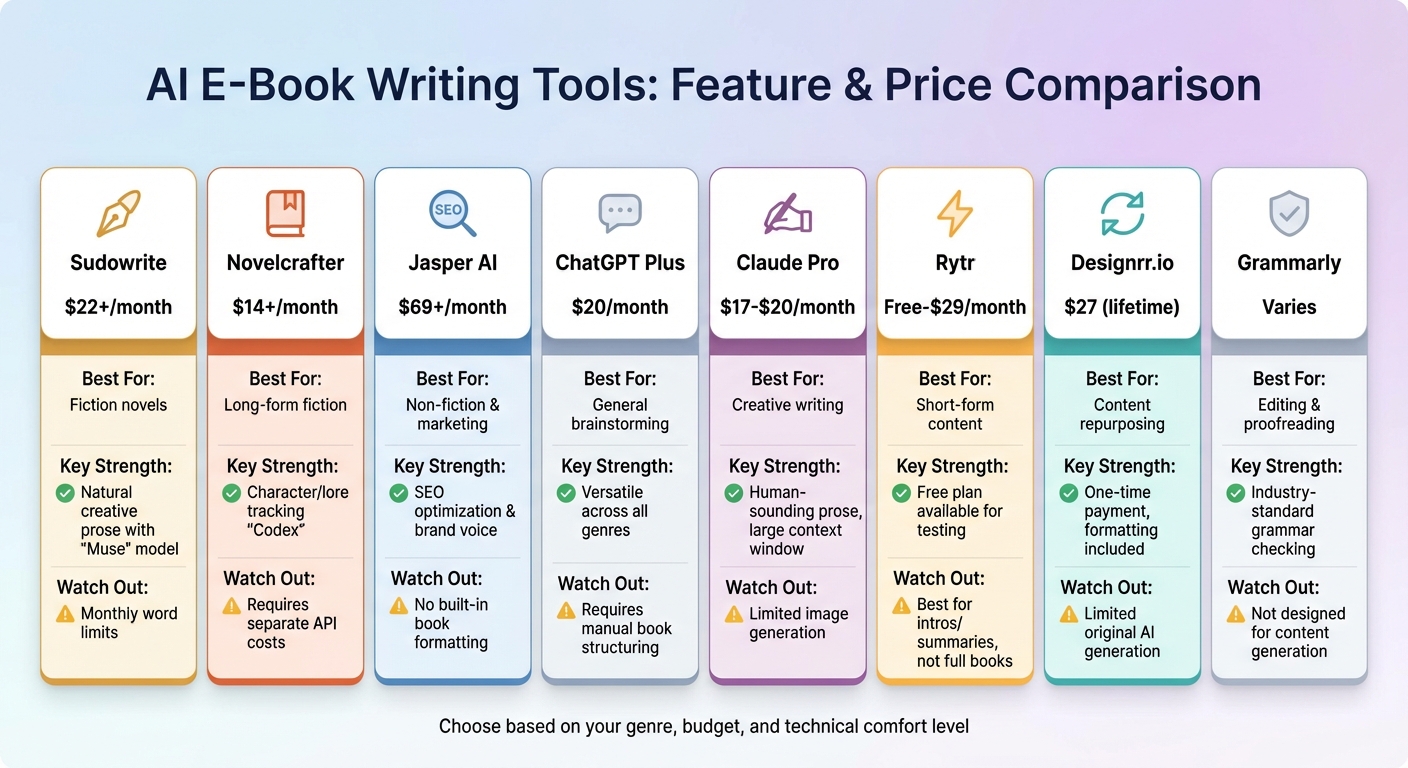
AI E-Book Writing Tools Comparison: Features, Pricing and Best Use Cases
Best AI Tools for Writing and Editing E-Books
When selecting AI tools for your e-book, your choice should align with your book’s genre and specific needs. For fiction writers, tools that excel in narrative flow, character development, and dialogue creation are essential. Sudowrite, for instance, offers the "Muse" model, a feature tailored to creative prose, starting at $22/month for its Professional plan. Another option, Novelcrafter, provides an "Artisan" plan for $14/month, which includes the "Codex" feature. This tool helps track character details and plot points, ensuring consistency across chapters – even linking events from Chapter 1 to Chapter 10.
For non-fiction authors, tools that focus on research, fact-checking, and SEO are critical. Jasper AI is a standout for structured content and maintaining brand voice, with pricing starting at $69/month. Frase specializes in optimizing content for search engines by analyzing Google results, while Perplexity offers real-time web searching with citations – perfect for educational or business-focused content.
If you’re looking for versatility, general-purpose chatbots like ChatGPT Plus ($20/month) and Claude Pro ($17-$20/month) are excellent for brainstorming and quick edits. Combining a specialized tool for drafting with a general chatbot for polishing can be an efficient strategy. For grammar and style checks, Grammarly remains a reliable choice across all genres. Meanwhile, Rytr offers a free plan, making it a great option for testing AI writing capabilities before committing to a paid subscription.
How to Match Tools to Your E-Book Goals
Once you’ve identified potential tools, focus on aligning them with your specific writing goals. Start by defining your budget and timeline. If you’re planning to write multiple books annually, tools with unlimited word counts or one-time payment options might be more cost-effective. For instance, Designrr.io offers a lifetime deal at $27, though it’s better for reformatting existing content rather than creating original manuscripts. On the other hand, subscription-based tools like Jasper can cost over $800 per year, so weigh the time savings against the expense.
Your genre plays a big role in tool selection. Fiction writers should prioritize tools with large context windows (at least 200,000 tokens) to ensure the AI can analyze the entire manuscript. For non-fiction, research capabilities, fact-checking, and the ability to import data from external sources like PDFs or Google Docs are essential.
Your comfort level with technology also matters. If you prefer simplicity, platforms like Automateed offer an all-in-one solution, handling everything from writing to formatting and cover design. For those who enjoy more control, Novelcrafter’s detailed lore management system and external API integration provide a customizable experience.
"Choosing the right AI writing tool for your eBook can be the difference between a smooth, productive writing experience and a frustrating roadblock." – Designrr
Take advantage of free trials by generating a sample chapter to evaluate the AI’s quality and structure. Also, ensure the tool’s export formats are compatible with your publishing platform – Amazon KDP, for example, has specific formatting requirements that not all AI tools support.
AI Tools Comparison Table
| Tool | Monthly Price | Best For | Key Strength | Watch Out For |
|---|---|---|---|---|
| Sudowrite | $22+ | Fiction novels | Natural creative prose with "Muse" model | Monthly word limits |
| Novelcrafter | $14+ | Long-form fiction | Character/lore tracking "Codex" | Requires separate API costs |
| Jasper AI | $69+ | Non-fiction & marketing | SEO optimization & brand voice | No built-in book formatting |
| ChatGPT Plus | $20 | General brainstorming | Versatile across all genres | Requires manual book structuring |
| Claude Pro | $17-$20 | Creative writing | Human-sounding prose, large context window | Limited image generation |
| Rytr | Free-$29 | Short-form content | Free plan available for testing | Best for intros/summaries, not full books |
| Designrr.io | $27 (lifetime) | Content repurposing | One-time payment, formatting included | Limited original AI generation |
| Grammarly | Varies | Editing & proofreading | Industry-standard grammar checking | Not designed for content generation |
With these tools in mind, you can now move on to planning your e-book’s structure.
Planning and Outlining Your E-Book
Using AI for Topic Ideas and Research
Before diving into writing, you need a topic that resonates with your audience. AI tools with web-search capabilities can help by scanning platforms like Google and Bing to identify trending subjects. Instead of relying on guesswork, you can leverage AI to explore forum discussions, social media chatter, and search data to uncover the real challenges your readers face.
The content-focused AI sector now accounts for 15% of the industry and is projected to reach $1.8 trillion by 2030. This growth translates to more advanced tools for pinpointing niche topics. For instance, by entering keywords related to emerging trends, AI can quickly highlight profitable self-publishing opportunities. Platforms like MyMap.AI even offer free daily credits, allowing you to experiment with ideas without any upfront investment.
AI isn’t just for finding hot topics – it’s also a valuable tool for analyzing competitors and fine-tuning your strategy. By inputting details about similar e-books, you can identify market gaps and determine optimal pricing. You can even draft a quick "hook" or landing page copy for your concept and test its appeal on social media before committing weeks to writing. This data-driven method replaces intuition with actionable insights, giving you a clearer path forward. This is a foundational step in building passive income with AI workflows that scale.
Creating Outlines with AI
Once your research is solid, AI can help you shape a detailed outline. Start by providing specifics like your working title, genre, target audience, and main themes – more detail results in better outlines. For fiction, include character details and plot ideas. For non-fiction, focus on the problems you’re addressing and the expertise you’re sharing.
Tools like Jasper offer templates such as "Blog Post Outline" to create titles, subtitles, and chapter breakdowns tailored to your audience. Narrato includes an AI Chat feature that allows you to discuss your book’s structure and then generate chapter outlines with opening statements and bulleted sub-sections using its Long Blog Article template. If you’re stuck, Audiorista can transform simple keywords into well-organized chapter sequences.
"Think of the generated outline as a starting point that you can then customize and adjust to fit your unique vision. The AI is there to jumpstart your creativity, not replace it entirely." – Sasha, Voicenotes
Use these AI-generated outlines as a foundation, tweaking them to align with your vision. Fiction writers can use tools like Sudowrite to develop storylines and character arcs, while non-fiction authors may find Narrato helpful for organizing research and citations. If you already have blog posts, transcripts, or notes, you can even ask AI to reorganize them into a logical e-book chapter flow.
With a clear outline in hand, you can confidently structure your chapters and subsections for a smooth and logical progression.
Organizing Chapters and Subsections
A comprehensive outline goes beyond just listing chapter titles. It should include multi-level structuring with subsections, key points for each chapter, and brief summaries to preview what’s coming next.
Whether your e-book is 10,000 or 100,000 words (roughly 40 to 400 pages), maintaining a consistent flow is key. A two-tier approach works well: first, outline high-level chapters, then drill down into detailed content for each chapter. This ensures every section transitions smoothly into the next. AI can even help identify gaps in your narrative or inconsistencies in your argument before you begin writing.
For those who think visually, MyMap.AI is a great tool for creating mind maps that illustrate connections between ideas, character dynamics, or topic hierarchies. Once you’re satisfied with the visual framework, you can convert it into a linear chapter list. Don’t forget to incorporate keyword research to improve your e-book’s discoverability.
sbb-itb-4bfa3ba
Writing, Editing, and Proofreading with AI
Generating Your First Draft with AI
Think of AI as your co-writer, not a replacement. When drafting your book, work chapter by chapter to maintain consistency. Tools like ChatGPT, for example, might lose track of details after about 3,000 words.
The secret to a solid first draft lies in how specific your prompts are. Clearly describe what you need for each section – whether it’s a detailed scene, a character’s motivation, or a chapter’s objective. Fiction writers can benefit from tools like Sudowrite, which offers a "Match My Style" feature. This tool analyzes samples of your writing so the AI can replicate your unique voice, sentence structure, and vocabulary. Another helpful trick is to use short, descriptive "beats" every 200 words to guide the AI’s narrative flow.
You can also automate your entire workflow by combining voice-to-text tools or existing notes to steer the AI’s output. Once the AI generates a section, edit it immediately and use the revised text as a foundation for the next prompt. This process keeps the AI aligned with your style and voice.
When your draft is complete, AI editing tools can help refine it further.
Editing and Refining with AI Tools
After drafting, the next step is polishing your work with specialized AI tools. Grammarly, for instance, catches over 95% of spelling, punctuation, and syntax errors. Fiction writers might explore Sudowrite’s sensory description features, which help add texture to scenes by incorporating all five senses. Non-fiction authors, on the other hand, can rely on tools like ProWritingAid or Frase IO for clarity and SEO optimization.
AI editing tools are also great for targeted improvements. For example, you can prompt the AI to focus on specific goals like “improving clarity and conciseness,” “spotting plot holes,” or “analyzing the logic and flow.” However, watch out for overused phrases that can make your writing feel robotic, and ensure the tone stays consistent throughout your e-book.
AI can even provide developmental feedback. It can help brainstorm solutions for plot issues or ensure dialogue stays true to each character. Tools like "Dialogue Distinctifier" or "Find Cliches – Then Kill Them" are particularly useful for refining specific elements. Don’t forget to check the overall formatting as well.
"Editing is where the real writing happens." – Sudowrite
Why Human Review Matters
Even with the best AI assistance, a human review is critical to finalize your e-book. AI can sometimes generate inaccurate information or "hallucinate", especially when dealing with niche or technical subjects. To ensure professional standards, manually verify all evidence, quotes, and data.
AI also has memory limitations, which can lead to inconsistencies in longer manuscripts. While AI excels at fixing grammar and mechanics, it often struggles with deeper aspects like story structure, complex character arcs, and thematic depth. Your unique voice and emotional insights are what make your e-book truly stand out, and a human review is essential to preserve that authenticity.
A practical approach is to follow a three-step process: first, use AI to address basic grammar and mechanical errors. Next, run specialized checks for pacing, readability, or other specific elements. Finally, conduct a thorough human review to ensure continuity, emotional resonance, and narrative depth. This method combines AI’s efficiency with the creative touch only you can provide. Many authors using AI report a 30–50% reduction in the time it takes to bring their books to market.
"No AI writing tool can guarantee that your eBook is error-free so it is essential to manually proofread." – Typeset Team
Designing, Formatting, and Publishing Your E-Book
Using AI for Formatting and Layout
Once you’ve polished your manuscript and outlined your content, AI can take the heavy lifting out of formatting and design. Tools like Typeset and Designrr can transform your manuscript into a professional-looking e-book in a matter of minutes. These platforms apply layouts, fonts, and color schemes automatically, saving you the hassle of manual formatting or the expense of hiring a designer.
AI tools such as Midjourney (priced between $10–$30/month), DALL-E 3, and Canva AI can also create eye-catching book covers with just a few text prompts. Considering that up to 80% of readers are initially attracted by a book’s cover design – and 60% make their purchase decisions based on it – these tools offer a cost-effective solution for independent authors.
When it comes to formatting the interior of your e-book, there are a few technical considerations to keep in mind:
- Use relative units like percentages or "em" for font sizes to ensure compatibility across devices.
- Keep image file sizes under 650KB for Amazon KDP.
- Work in the RGB color space (specifically sRGB).
- Use semantic HTML5 markup (e.g., H1 for chapters, H2 for sections) to create a functional Table of Contents.
Accessibility is equally important. The European Accessibility Act mandates that all newly published e-books meet WCAG 2.1 Level AA standards by June 28, 2025. This includes features like alt text, proper semantic structure, and a minimum 4.5:1 color contrast ratio. Tools like ACE by DAISY and the SMART tool can help ensure your e-book meets these standards. With 1.3 billion people worldwide living with significant disabilities, meeting these requirements not only broadens your audience but also ensures compliance with legal standards.
"The European Accessibility Act must be met by June 28, 2025… If your ebook doesn’t meet these standards after the deadline, retailers can legally reject it." – Designrr
Preparing Your E-Book for Publishing Platforms
Once your e-book design is finalized, it’s time to prepare your file for publishing. The EPUB 3 format is now the industry standard and is accepted by all major platforms, including Amazon (which converts it to AZW3), Apple Books, Google Play, and Kobo. Since Amazon phased out MOBI support in late 2022, authors can now streamline their workflows by using a single, high-quality EPUB file for all platforms.
Before uploading, validate your file with EPUBCheck to catch any formatting issues. Preview your e-book on different devices using tools like Kindle Previewer to ensure it looks great everywhere. Keep these technical specs in mind:
- Amazon KDP requires cover images to be at least 1,600 x 2,560 pixels.
- Apple Books requires a minimum of 1,400 pixels on the shorter side.
- Interior images should have a resolution of 300–600 DPI for sharp visuals.
Optimizing your metadata is another key step. Services like ManuscriptReport (priced at $49.99 per report) analyze your manuscript to generate optimized keywords, KDP categories, and subtitles. Authors using these tools have reported a 40–60% increase in discoverability. For example, in 2025, romance author Jean Joachim used ManuscriptReport to refine her metadata and advertising strategy, cutting her ad costs by 50% while boosting sales by 60%.
Publishing and Promoting Your E-Book
Once your e-book is formatted and validated, the focus shifts to publishing and promotion. Amazon KDP remains the dominant platform for U.S. e-book sales, accounting for 68–83% of the market. It offers a 70% royalty rate for books priced between $2.99 and $9.99, though royalties drop to 35% outside this range. Meanwhile, Apple Books provides a flat 70% royalty rate regardless of pricing. It’s worth noting that as of June 10, 2025, Amazon reduced print royalties from 60% to 50% for books priced under $9.98, prompting many authors to prioritize digital publishing.
AI doesn’t just streamline the creation process – it also revolutionizes how authors market their books. Once your e-book is live, AI tools can generate tailored social media posts, email campaigns, and ad copy. They can even analyze your manuscript to identify themes and hooks that resonate with readers. Authors leveraging these AI-driven workflows report 30–50% faster time-to-market and 60% lower production costs compared to traditional methods.
"AI has emerged as the great equalizer, democratizing access to professional-grade publishing services that were once reserved for traditionally published authors with large budgets." – ManuscriptReport
Conclusion
AI has reshaped the way e-books are created. What once took months and cost thousands of dollars can now be accomplished in weeks for just a few hundred dollars. The results? 30–50% faster time-to-market, 60–70% lower production costs, and over 30 hours saved per book. This means you can produce more titles in less time, creating a steady income stream.
AI doesn’t replace your creativity – it enhances it. Tools like Jasper.ai, Sudowrite, and Designrr handle tedious tasks like formatting, grammar checks, and layout design, freeing you to focus on the elements that make your e-book stand out. As Paul Clifford, Founder of Designrr.io, explains:
"AI tools should be seen as a powerful assistant, not a complete replacement for your own creativity and expertise".
To make the most of these tools, start by identifying your biggest challenge. Choose from an AI tools list that addresses it, experiment with free versions, and use specific prompts. Always review and fact-check the output to ensure quality.
The market reflects the power of these advancements – around 7,500 new books are published online every day. To stand out, you need both speed and quality. AI delivers efficiency, while your oversight ensures the final product meets your standards. With the global AI market expected to reach $1.8 trillion by 2030, there’s no better time to dive in. The tools are ready, and the opportunity is here.
Whether you’re working on your first e-book or your fiftieth, AI can help you streamline your process, publish faster, and connect with more readers. The barriers to entry have never been lower, and the potential for scalable income has never been greater. This guide has broken down the steps – now it’s your turn to take action. Start your project, refine as you go, and let AI transform the way you create. For more tips and resources on using AI to automate your workflows and build passive income, visit Your Automated Life.
FAQs
How can I pick the best AI tool for my e-book’s genre?
Choosing the right AI tool for your e-book largely depends on the genre you’re working in. If you’re writing fiction, prioritize tools that assist with story creation, character building, and plot development. For nonfiction, look for features that help with organizing research, managing facts, and handling citations. Many tools offer free trials or demos – take advantage of these to get a feel for their functionality before committing to a subscription.
When comparing tools, keep a few essential aspects in mind: features tailored to your genre, ease of use for outlining and editing, formatting options for platforms like Kindle or PDF, and compatibility with your current workflow (like Google Docs or Notion). Matching the tool’s strengths to your writing style and budget can streamline your process, helping you create polished, engaging content without compromising your unique voice.
How much time and money can AI save when creating an e-book?
Using AI to create e-books can slash both costs and production time dramatically. On average, it reduces expenses by 60–70%, which translates to saving authors more than $2,000 per title. Plus, it speeds up the entire process – cutting down creation time by over 30 hours per book, a whopping 75% reduction. This means you could have a completed e-book within just a few days, or even as fast as 48 hours, instead of spending months on it.
AI takes care of tasks like writing, editing, and formatting, freeing up your time and energy to focus on the creative and strategic aspects of your work.
How does AI help ensure my e-book is ready for publishing platforms?
AI takes the hassle out of getting your e-book ready for publishing by handling the nitty-gritty details. It can automatically format your manuscript to fit the specific requirements of various platforms, including file type, layout, and dimensions. Beyond formatting, AI can also generate metadata that aligns with publishing standards, design polished cover art, and conduct detailed editorial and technical reviews to ensure your e-book ticks all the necessary boxes.
By automating these tasks, AI not only saves you time but also reduces the risk of errors, making the entire publishing process faster and more seamless.