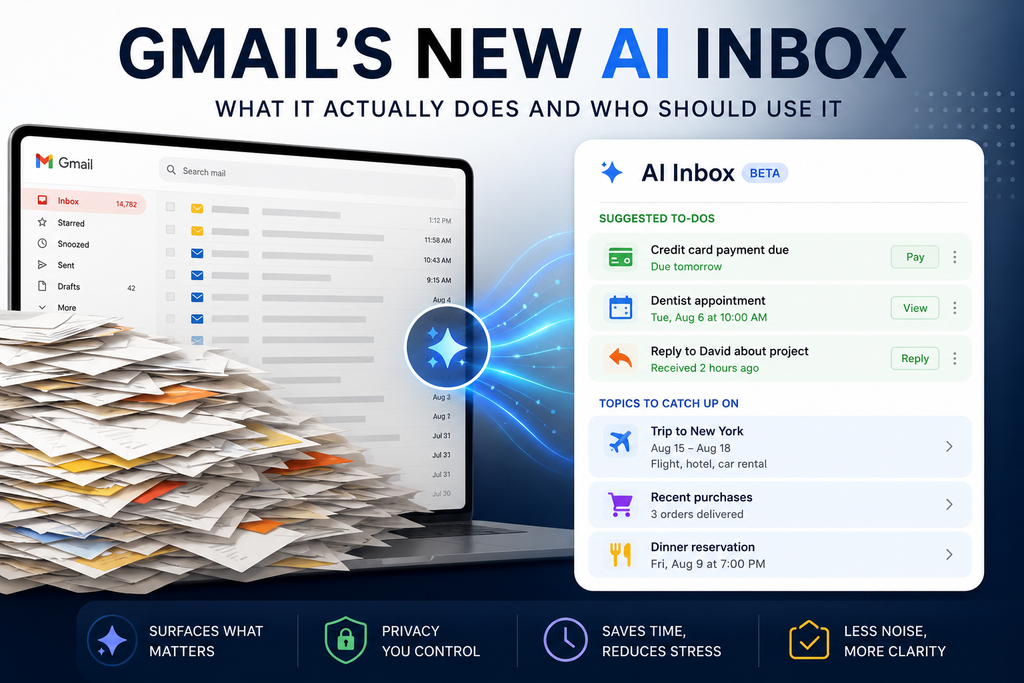
Google is turning Gmail from a list of messages into something closer to a personal assistant. Here’s what AI Inbox actually does, what it can see, what it costs, and whether it’s worth using.
If your Gmail inbox has become a graveyard of bills, appointment reminders, travel confirmations, school messages, receipts and conversations you promised yourself you’d answer later, Google thinks AI can help.
Its new AI Inbox uses Gemini to look through incoming email and pull important information into a much simpler view.
Instead of showing you another chronological list of messages, AI Inbox tries to answer a more useful question:
What in my inbox actually needs my attention?
After looking into how the feature works, its limitations and Google’s privacy policies, I think AI Inbox is one of Google’s more practical uses of AI.
But it isn’t for everyone – and you may not even have access to it yet.
Quick Take
What it is: An AI-powered Gmail view that identifies important tasks and topics from your email.
Best for: People with busy personal inboxes who regularly receive bills, appointments, travel information, purchases and other actionable email.
Cost: Requires Google AI Plus, Pro or Ultra for personal Gmail accounts.
Availability: Currently English only in the United States. Google says AI Inbox is still in beta.
Privacy: Google says personal Gmail messages are not used to train its foundational AI models.
YAL verdict: Promising – especially if email has become a second to do list. But don’t subscribe to a paid AI plan for this feature alone.
What is Gmail AI Inbox?
AI Inbox is an alternative Gmail view designed to surface information Gemini believes is important.
Google says roughly 3 billion people use Gmail, and its broader goal is to turn Gmail into a more proactive assistant rather than simply a place where messages accumulate.
AI Inbox organizes information into two main sections.
Suggested to do’s
These are things Gmail believes require action.
For example, your inbox might contain:
- a credit card payment due tomorrow;
- a dentist appointment that needs confirmation;
- an email you need to respond to;
- something related to an upcoming trip; or
- another time-sensitive task buried in your messages.
AI Inbox can surface the task and emphasize information such as its due date rather than requiring you to open and reread the original email.
Topics to catch up on
Not every important email requires an action.
Sometimes you simply need to know what’s happening.
AI Inbox can group and summarize information associated with subjects such as upcoming travel, restaurant reservations and purchase confirmations.
That’s a subtle but important difference.
Traditional Gmail asks:
Which email do you want to read?
AI Inbox is increasingly trying to answer:
What do you need to know or do?
That’s potentially much more useful.
An example of where AI Inbox could actually save time
Imagine you’ve got 1,800 messages sitting in Gmail.
Buried among them are:
- an electric bill due Friday;
- a dentist appointment next Tuesday;
- your hotel confirmation for an upcoming trip;
- a shipping notification;
- three emails about a project;
- a restaurant reservation; and
- hundreds of newsletters, promotions and miscellaneous messages.
Normally, you have to notice those important messages yourself, star them, search for them later or move the information into another app.
AI Inbox attempts to do some of that triage automatically.
Google says it can identify important people partly through signals such as who you email frequently, who’s in your contacts and relationships inferred from email content.
At Google I/O 2026, Google expanded the concept further. AI Inbox can surface relevant links to Docs, Sheets and Slides beside a task, create personalized draft replies, let you mark tasks complete and dismiss suggestions that aren’t useful.
That’s where this starts becoming more interesting than another AI summary button.
What AI Inbox does not look at
There are some important limitations.
According to Google’s current documentation, AI Inbox primarily works with messages in Gmail’s Primary tab.
It does not surface information from Social or Promotions.
It also filters out messages you’ve:
- archived;
- deleted;
- muted;
- snoozed; or
- received as spam.
And currently AI Inbox does not support information contained inside attachments, delegated inboxes or encrypted emails.
That means AI Inbox isn’t literally reading every piece of information associated with your email account and building a perfect life management system.
It’s much narrower than that.
And that’s worth knowing before relying on it.
AI Inbox isn’t the same as Gmail’s other new AI features
This is where Google’s naming gets confusing.
AI Inbox is only one part of Gmail’s larger Gemini overhaul.
Gmail now has several different AI capabilities.
AI conversation summaries
Open a long email conversation and Gemini can summarize the important parts.
This is one of the most broadly available features and is available globally for personal Gmail accounts in several languages.
AI search
Instead of remembering Gmail search operators, you can ask questions naturally.
For example:
“When is my flight to Hawaii?”
Gmail can search relevant messages and generate an answer rather than simply returning a pile of emails.
This may ultimately be one of Gmail’s most useful AI features.
Help Me Write
Gemini can draft a new email or rewrite something you’ve already written.
Suggested Replies
Gmail can generate more detailed replies based on the context of an email conversation.
Proofread
Gemini can make suggestions involving tone, conciseness and writing style.
And then there’s AI Inbox, which sits above all of this and tries to organize what deserves your attention in the first place.
The privacy question: Is Google training Gemini on your emails?
This is probably the first question many people should ask.
Google’s answer is no.
Google says it does not train its foundational AI models, including Gemini, on personal Gmail messages.
According to Google, when Gemini needs access to an email for a task such as summarization, it processes the information for that specific task rather than retaining your inbox data afterward.
That’s reassuring.
But there’s an important distinction between:
“Google doesn’t train Gemini on my emails”
and
“AI doesn’t process my emails.”
AI Inbox obviously needs to analyze information in your inbox to determine what’s important.
If you’re uncomfortable with automated systems analyzing email content at all, AI Inbox probably isn’t for you.
Google also requires its relevant Smart Features settings to be enabled before AI Inbox can work.
So our advice is simple:
Don’t enable AI features merely because they’re new. Understand what access they require and decide whether the convenience is worth that tradeoff for you.
Who can use AI Inbox right now?
This is one of the biggest limitations.
As of August 2026, Google’s current Gmail documentation says AI Inbox is available in English in the United States.
For personal Gmail accounts, you need one of these subscriptions:
- Google AI Plus
- Google AI Pro
- Google AI Ultra
It’s available on the web, iOS and Android.
For work and school accounts, Google’s requirements are different: AI Inbox currently requires Workspace Enterprise Plus with access to Gemini Beta, and administrators control whether beta features are available.
Google also continues to describe AI Inbox as beta, which means features and behavior can change.
So if you’re eligible but don’t see exactly what someone else sees, that’s not necessarily unusual during the rollout.
Who should actually use AI Inbox?
I think there are several groups for whom this could become genuinely useful.
People whose email has become their unofficial to-do list
This is the obvious one.
If you constantly think:
“I know there was an email about that somewhere…”
AI Inbox addresses a real problem.
Busy parents and families
School messages, sports schedules, appointments, purchases, travel, bills, reservations and dozens of other small responsibilities increasingly arrive through email.
Having Gmail surface important actions could genuinely reduce some of that mental load.
People who travel frequently
Travel confirmations are scattered across airlines, hotels, rental cars, restaurants and booking services.
Google specifically identifies travel as one of the types of information AI Inbox can help organize.
People who hate organizing email
Some people maintain pristine folders, labels, filters and inbox-zero systems.
Others have 14,782 unread emails.
AI Inbox is probably much more interesting to the second group. 😂
Who probably doesn’t need it?
There are also several cases where I wouldn’t get excited.
Inbox-zero people
If you’ve already built an effective email workflow using filters, labels, folders and task management, AI Inbox may simply reproduce something you’re already doing well.
People with very little email
If you receive 15 meaningful emails a week, you probably don’t need artificial intelligence to tell you which ones matter.
Anyone uncomfortable with AI processing email content
The privacy protections may be perfectly acceptable to many people.
They won’t be acceptable to everyone.
That’s a personal decision.
Anyone considering paying for Google AI just for AI Inbox
This is the big one.
I wouldn’t.
At least not yet.
If you’re already paying for Google AI Plus, Pro or Ultra and AI Inbox is included, absolutely try it.
But I wouldn’t recommend taking on another monthly subscription solely because Gmail can organize your inbox with AI.
There needs to be additional value elsewhere in the subscription for the economics to make sense.
What I like about Google’s approach
AI Inbox represents something I’d like to see much more of from AI companies.
It isn’t asking you to become an AI expert.
You don’t need to learn prompt engineering.
You don’t need to create an agent.
You don’t need to build an automation in another service.
You don’t even really need to understand Gemini.
The AI disappears into something you already use.
That’s potentially where AI becomes most useful for ordinary people.
A good automation shouldn’t make you think:
“Wow, look at this sophisticated artificial intelligence.”
It should make you think:
“Good. That’s one less thing I had to remember.”
That is a much higher standard.
What worries me
AI Inbox is deciding what’s important.
And AI systems make mistakes.
An algorithm surfacing the wrong restaurant reservation isn’t a catastrophe.
Failing to surface something genuinely important could be.
That’s why I wouldn’t treat AI Inbox as a replacement for your inbox, at least not today.
Treat it as another layer on top of Gmail.
Helpful assistant? Yes.
Sole guardian of everything important in your email? No.
Google itself labels the feature beta, which is another reason to maintain that distinction.
The YAL Verdict
Promising – and one of the more practical consumer AI features we’ve seen.
Gmail’s AI Inbox isn’t revolutionary because it uses Gemini.
It’s interesting because it attacks an annoying everyday problem:
Our inboxes contain more information than we can comfortably keep track of.
For people already paying for an eligible Google AI plan, I think AI Inbox is absolutely worth trying.
But I wouldn’t subscribe to Google AI solely for this feature yet.
The feature is still in beta, availability remains limited, attachments aren’t supported, and you’re ultimately trusting an AI system to decide which information deserves your attention.
So our recommendation is:
Already paying for Google AI? Try it.
Constantly overwhelmed by Gmail? Keep an eye on it.
Thinking about buying Google AI only for AI Inbox? Wait.
And here’s our favorite test for tools like this:
The YAL Loss Test
After using AI Inbox for a month, ask yourself:
If Google removed this tomorrow, would I genuinely miss it?
If the answer is yes, AI Inbox is saving you something valuable.
If the answer is no, it’s probably just another AI feature.
And that’s ultimately what matters.
Your Automated Life independently researches the tools and technology we cover. We aim to distinguish documented facts from our analysis and recommendations. Product availability and features can change; this article was researched and checked in August 2026.